Google Ads conversion windows determine which purchases are counted, but brand and non-brand campaigns may not receive those conversions on the same timeline. This can distort recent performance comparisons and influence the data Smart Bidding uses to allocate spend. If you don't account for conversion lag when reading results or setting windows, you can report misleading cost per acquisition (CPA) figures to your executive team and move budget away from campaigns whose conversions simply haven't arrived yet.
Why Can a 30-Day Conversion Window Make Brand Campaigns Look More Efficient?
A 30-day conversion window can make brand campaigns appear more efficient than non-brand campaigns when their conversions arrive at different speeds. The problem arises when marketers compare recent performance before all eligible conversions have been recorded.
A conversion window is the amount of time Google Ads allows between an ad interaction and a conversion for that conversion to be counted. The default click-through conversion window for Search campaigns is 30 days. If someone clicks an ad and purchases within that period, the conversion can be credited to the ad. If the purchase falls outside the window, it cannot be counted for that interaction.
Brand and non-brand searchers may enter the buying process at different stages.
Someone searching for a specific brand may already know what they want. Someone searching for a broader product category may still be comparing options. That second customer could return days or weeks later to complete a purchase.
Brand campaigns often look substantially more efficient than non-brand campaigns. PipeRocket's 2026 analysis of 53+ B2B SaaS accounts it manages found a cost per lead of $34 for brand versus $207 for non-brand over the 12 months ending June 2026. Yet conversion rates were nearly identical: 3.73% for brand and 3.94% for non-brand. Much of the reported cost difference reflected cheaper brand clicks, not stronger conversion rates.
Measured's 2026 incrementality benchmarks add another consideration: branded search can receive credit for purchases customers were already likely to make, while non-brand prospecting can influence purchases completed later through brand searches or direct visits.
Neither study measures brand versus non-brand conversion lag directly. But together, they show why reported efficiency alone is an incomplete basis for budget decisions. If non-brand conversions also take longer to arrive, comparing recent performance introduces another potential distortion, one that advertisers can investigate using their own Google Ads data.
How Conversion Lag Distorts Recent Reporting
Google Ads attributes conversions back to the interaction date, a fundamental mechanic that misleads operators into thinking recent spend performed poorly when data simply hasn't matured. When customers take longer to convert, recent reporting periods remain incomplete and can temporarily overstate CPA or understate return on ad spend (ROAS).
Consider a scenario where someone clicks a non-brand ad on November 1 but does not purchase until November 18.
On November 9, that purchase is missing from the November 1 performance data. Once the purchase occurs and is recorded, Google Ads can attribute it back to the November 1 interaction.
The advertising cost was already recorded. The conversion arrives later.
Google notes that conversions can be reported up to 90 days after the click, so the cost side of a date range is complete long before the conversion side is.
If brand customers typically purchase within a day while non-brand customers take two weeks, the brand campaign may have most of its conversions recorded long before the non-brand campaign does.
Google explicitly acknowledges the problem in its conversion lag documentation, noting that recent data can make CPA appear inflated and ROAS deflated until additional conversions arrive.
The reporting mistake is treating a recent 30-day date range as though every click within that range has already had 30 days to convert. A click from yesterday has not had the same opportunity to produce a recorded purchase as a click from four weeks ago.
How to Check Conversion Lag in Google Ads
Google Ads provides several ways to investigate conversion lag, including the Days to conversion segment, attribution reports, and conversion-delay estimates in campaign and bid strategy reporting. Each serves a different purpose: historical lag data shows when conversions arrived, while conversion-delay estimates help identify how much recent performance may still be incomplete.
Start in Campaigns → Campaigns and select a date range that ended at least one full conversion window ago. Click the Segment icon above the campaign table, then select Conversions → Days to conversion. This breaks the conversion columns into rows showing how long conversions took to arrive.
Separate brand and non-brand Search campaigns to compare their conversion timelines.
For another view, open Goals → Attribution and select Path metrics → Avg. days to conversion. This report allows you to examine conversion timing from the first or last ad interaction. These are different starting points, so use the same definition when comparing results.
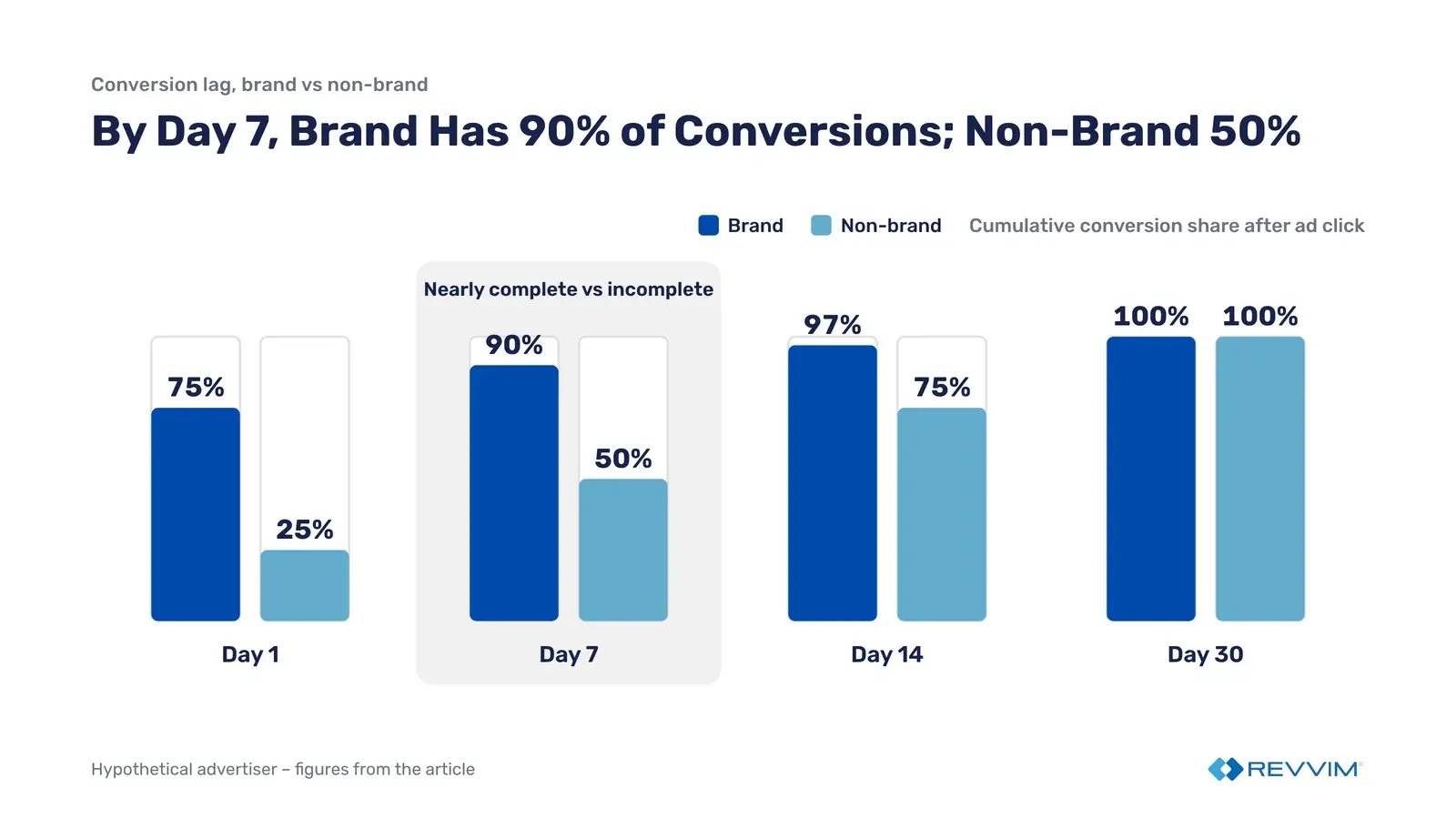
Consider the following hypothetical advertiser:
|
Days After Ad Click |
Brand: Cumulative Conversion Share |
Non-Brand: Cumulative Conversion Share |
|---|---|---|
|
Day 1 |
75% |
25% |
|
Day 7 |
90% |
50% |
|
Day 14 |
97% |
75% |
|
Day 30 |
100% |
100% |
After seven days, brand has recorded 90% of its eventual conversions, while non-brand has recorded only 50%. Comparing CPA at that point would mean evaluating nearly complete brand data against substantially incomplete non-brand data.
Haus's 2025 analysis of its branded search incrementality tests points the same way for brand. In the tests that kept measuring after the ads stopped, lift rose by just under 10% on average, and Haus concluded that branded search is typically the last, or close to the last, step before a purchase.
Haus's testing guidance shows how much that timing varies by vertical: a furniture purchase can come about two weeks after the first click, while enterprise software can run on a 90-day sales cycle.
Google Ads also provides a faster way to check whether recent results are still developing. In the campaign table, hover over the conversion metrics to look for conversion-lag information. For campaigns using Smart Bidding, open the Bid strategy report and inspect the conversion metrics and performance chart.
Google can show forecasted conversion data in the hover cards, add annotations to the date picker when a selected range is affected by conversion lag, and, for supported campaign types, flag conversion delay as a root cause in Explanations.
These estimates are useful, but they are not finalized results. Before treating yesterday's unusually high CPA as a performance problem, check whether Google is still expecting conversions from those clicks.
For more detail, see Google's documentation on finding conversion lag reporting data and understanding conversion delays.
A campaign whose conversions arrive quickly may appear to be the better use of budget before a slower-converting campaign's full results are available.
How Does the Conversion Window Change What Smart Bidding Optimizes Toward?
Smart Bidding optimizes toward conversions eligible to be counted within the selected conversion window. Cut your conversion window too short and target cost per acquisition (tCPA) and target return on ad spend (tROAS) strategies stop learning from purchases that happen after the cutoff. The window limits what Google Ads can measure; it has no effect on how much revenue the business actually generates.
Smart Bidding uses historical conversion data and auction-time signals to predict the likelihood and value of a conversion. Google's models also account for conversion delays, adjusting how they weigh recent versus historical performance based on the advertiser's conversion cycle.
But Smart Bidding can only learn from conversions that qualify under the configured measurement settings.
Consider a customer who clicks a Search ad and purchases 18 days later. With a 30-day conversion window, that purchase can contribute to the campaign's bidding data. Shorten the window to seven days, and the purchase is no longer eligible to be counted for that click.
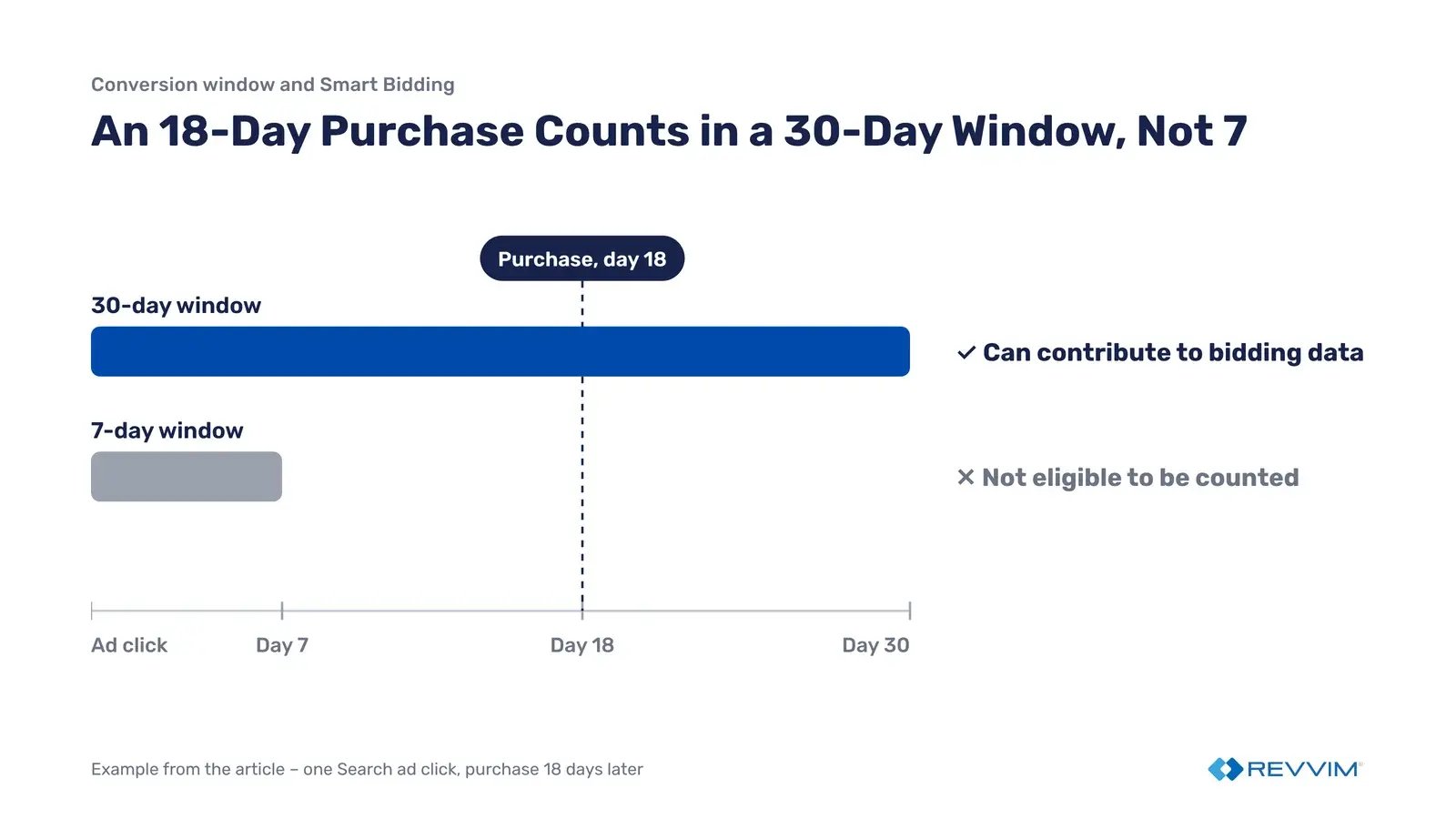
If certain search queries regularly lead to purchases beyond the new cutoff, Google Ads will no longer receive those purchases as attributed conversion signals. Over time, this can change how Smart Bidding evaluates the traffic associated with those queries.
That does not mean Google automatically reduces bids on every longer-funnel keyword. Smart Bidding can use query-level data beyond your bid strategy and other signals to inform auction-time decisions, so the response depends on the broader conversion history and campaign configuration.
Google recommends click-through windows of at least seven days to preserve a richer set of conversion data. The appropriate window still depends on the advertiser's actual purchase cycle.
What Happens When You Shorten or Lengthen the Window?
A shorter window can make performance reporting mature sooner, but it may exclude valid conversions. A longer window captures more of the purchase cycle, although it takes longer for the complete results of recent clicks to become available.
|
Shorter Conversion Window |
Longer Conversion Window |
|
|---|---|---|
|
Reported conversions |
Fewer conversions counted if purchases occur after the cutoff |
More delayed conversions can be counted |
|
Reported CPA |
Can increase as fewer purchases receive credit |
Can decrease as additional purchases receive credit |
|
Reported ROAS |
Can decrease as delayed purchase value is excluded |
Can increase as delayed purchase value is included |
|
Smart Bidding signals |
Excludes later conversions, reducing eligible data |
Includes later conversions, providing a more complete picture |
|
Primary tradeoff |
Earlier reporting maturity, potentially incomplete measurement |
More complete measurement, longer reporting maturity |
Google's bidding models already account for conversion delays, so shortening the window is not necessary simply to make recent performance data available sooner. A shorter window may make reporting mature faster, but it can also remove valuable conversion signals.
Before changing the setting, review how many conversions and how much conversion value would fall outside the proposed window. After the change, monitor conversion volume, CPA, ROAS, and bid strategy performance. If reported efficiency changes, determine whether Google is counting purchases differently before attributing the movement to actual bidding performance.
How Long Does Smart Bidding Take to Adapt?
Google's visible Learning status is not a reliable measure of when campaign performance has stabilized. Smart Bidding continuously incorporates conversion data, and the time required to evaluate performance depends heavily on conversion volume and the length of the purchase cycle.
Google's Smart Bidding learning documentation states that the Learning status lasts up to seven days, but performance may take one to two conversion cycles to converge toward a new goal.
A conversion cycle is the time between an ad interaction and a conversion. Google identifies conversion volume, conversion-cycle length, and campaign settings as the primary factors influencing stabilization.
Changing the conversion window alone is not documented as an automatic trigger for Learning status. However, it changes which future conversions can be counted and used for optimization.
This is why a window change should not be evaluated immediately through CPA or ROAS alone.
Google's own guidance is to let at least one full conversion cycle pass before judging Smart Bidding performance. Its bidding models also give less weight to recent data when conversions take longer to arrive, so they don't overreact to clicks that have not finished converting.
If reported CPA increases after shortening the window, the first question is whether Google Ads is counting fewer purchases, not whether advertising performance suddenly deteriorated.
Similarly, a lower reported CPA after lengthening a window does not establish that the campaign is acquiring customers more efficiently.
When reported performance moves, check these before changing bids or budgets:
|
Symptom |
Likely cause |
What to check |
|---|---|---|
|
Recent non-brand CPA spikes while brand looks stable |
Recent clicks are still converting |
Hover over the Conversions column in the campaign table for conversion lag data |
|
Reported conversions fall after a window change, but orders don't |
Fewer purchases qualify under the new window |
The change date in Change history and the Days to conversion segment for a mature period |
|
Conversions and conversion value rise with no change in orders |
The same purchase is counted by two actions in a custom goal |
Segment the campaign's results by conversion action |
How Do You Audit and Change Conversion Windows Without Breaking Reporting?
Conversion windows should reflect the time customers actually take to convert, but changing them requires care. Before editing a setting, verify the current window, review conversion lag, and establish how the change will affect reporting and Smart Bidding.
Google Ads supports three types of conversion windows, each governing a different ad interaction.
|
Window Type |
Default |
Configurable Range |
What It Governs |
|---|---|---|---|
|
Click-through |
30 days for Search and Display |
1–30 days, with 60- and 90-day options depending on conversion source; Analytics-managed conversions support whole numbers from 1–90 days |
Conversions after an ad click |
|
View-through |
1 day |
Generally 1–30 days, depending on conversion source and interface |
Eligible conversions after an ad impression without an ad interaction |
|
Engaged-view |
3 days |
1–30 days |
Conversions after a qualifying video engagement |
Google's August 11, 2026 update also introduced custom whole-number click-through windows from 1 to 90 days for conversions managed in Google Analytics, replacing the previous preset choices. Engaged-view windows can now be set from 1 to 30 days rather than remaining fixed at three days.
Conversion windows are configured per conversion action, not per campaign.
To review an existing setting, navigate to Goals → Conversions → Summary, select the relevant conversion action, and choose Edit settings. Expand the applicable conversion-window setting to see its current value.
For conversions created from Google Analytics events, where the window is managed depends on the attribution-channel settings. In Google Analytics, go to Advertising → Conversion management → Conversion attribution settings and check which channels are eligible to receive conversion credit.
When Google paid channels is selected, the conversion window can be managed in Google Ads. When Paid and organic channels is selected, the window must be managed in Google Analytics under Advertising → Conversion management.
That means some Google Analytics conversion settings may not be editable directly in Google Ads. Before changing a window, confirm the conversion source, attribution-channel setting, and current window rather than assuming the Google Ads interface controls everything.
Should Brand and Non-Brand Use Different Conversion Windows?
A shared purchase conversion window is generally the simpler choice when it captures the relevant purchase cycle for both campaign types. Different windows should only be considered when the measurement benefit is clear enough to justify separate conversion actions and more complex reporting.
If brand conversions mostly arrive within a week but non-brand conversions take several weeks, that does not automatically justify shortening the brand window. Keeping both at 30 days may be appropriate, provided the reporting periods are allowed to mature.
Separate windows require separate conversion actions because Google Ads does not allow different campaign-level windows for the same action. Advertisers can assign those actions through campaign-specific conversion goals, but the configuration creates a risk of counting the same purchase twice.
Swapping in new conversion actions is also a bigger change than editing a window. Google lists a significant change to the conversion goals or actions a bid strategy optimizes toward as a trigger for Learning status, along with a new bid strategy and adding or removing campaigns, ad groups or keywords.
Normally, Google Ads uses Primary conversion actions for bidding when their associated goals are selected. Secondary actions are observation-only and appear in the All conversions column rather than the main Conversions column.
Custom goals are an exception. Under Goals → Conversions → Summary → Custom goals, an advertiser can create a goal containing both primary and secondary actions. If that custom goal is assigned to a campaign under Campaigns → Settings → Conversion goals, Google Ads uses every included action for bidding, regardless of its Primary or Secondary designation.
Consider an account tracking the same purchase through a native Google Ads conversion action and an imported Google Analytics purchase action. If both are included in the campaign's optimization goals, the same order can be counted twice. Reported conversions and conversion value may increase without any additional sales, giving Smart Bidding an inflated picture of performance.
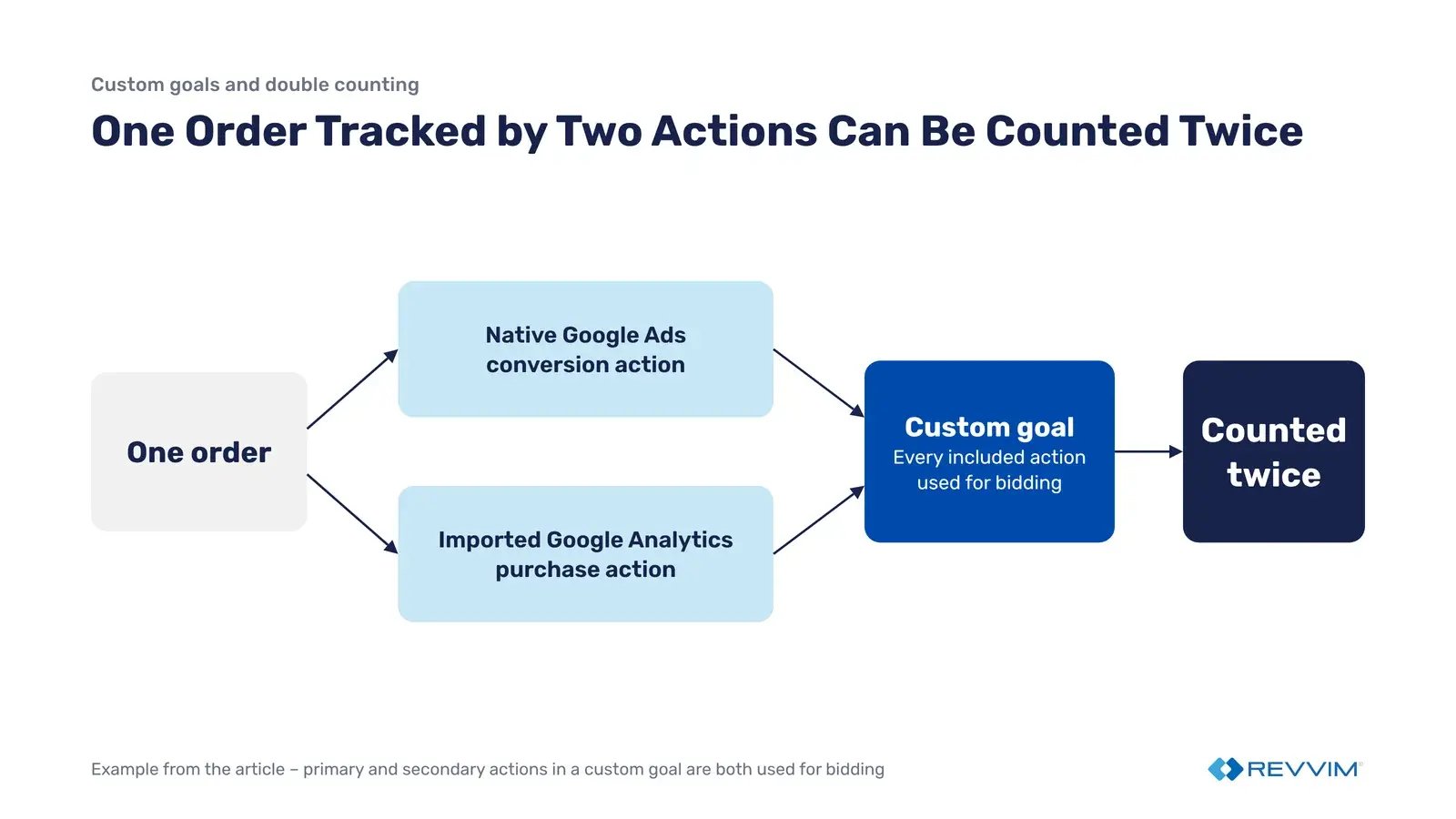
Before activating a custom goal, review the actions it contains, confirm which goals each campaign uses, and segment campaign results by conversion action. Check that the same purchase is not contributing multiple times to the Conversions column.
Larger advertisers with substantial conversion volume, clearly different purchase cycles, and dedicated measurement support have more capacity to evaluate separate windows safely.
How to Change a Window Without Disrupting Reporting
Google Ads applies conversion-window changes going forward rather than retroactively rebuilding historical conversions. As a result, the transition can create a reporting discontinuity that needs to be documented and explained before leadership interprets the numbers.
Google's conversion-window documentation confirms that excluded historical conversions are not automatically recovered when a window is extended later.
A controlled change should follow a documented process:
|
Step |
Action |
Owner |
|---|---|---|
|
1. Audit |
Record existing windows, conversion actions, and campaign goals |
Paid Search |
|
2. Validate |
Review mature conversion-lag data and identify which conversions a proposed window would exclude |
Paid Search / Analytics |
|
3. Establish a baseline |
Save mature CPA, ROAS, conversion volume, and conversion value before making the change |
Analytics |
|
4. Make and document the change |
Update the window and record the exact date, previous setting, and new setting |
Paid Search |
|
5. Monitor |
Watch conversion volume, bidding status, CPA, and ROAS without making unnecessary simultaneous adjustments |
Paid Search |
|
6. Reconcile reporting |
Compare results only after post-change clicks have had sufficient time to mature, and explain the measurement change to finance |
Analytics / Finance |
Conversion-setting changes made through Google Analytics may appear in the Google Ads Change history page rather than alongside ordinary campaign edits.
Avoid making multiple budget, target, or conversion-goal changes during the same evaluation period. Otherwise, it becomes difficult to separate the effect of the conversion-window adjustment from changes in campaign delivery.
Finance should also know what to expect before the change occurs.
If a shorter window excludes purchases previously counted by Google Ads, reported conversions and conversion value may decline even when actual orders and revenue remain stable. That reporting change should not automatically be treated as deteriorating marketing performance.
For a clean year-over-year or quarter-over-quarter comparison, the team must identify when the measurement definition changed and avoid interpreting the resulting step change as a like-for-like performance movement.
Frequently Asked Questions
What Conversion Window Should Brand Search Campaigns Use?
Brand Search campaigns should use a window long enough to capture their actual purchase cycle. Google's default is 30 days, but that is not a brand-specific recommendation. Review the Days to conversion segment before making changes. Shortening the window does not correct over-attribution to brand campaigns.
Does Changing the Conversion Window Reset Smart Bidding Learning?
Google does not document conversion-window changes alone as automatically triggering Learning status. Its Smart Bidding guidance associates that status with major structural or conversion-goal changes. Changing a window still affects which conversions are counted. Monitor performance after the change and allow enough time for conversion data to mature.
Why Do My Google Ads Conversions Keep Increasing for Days After the Fact?
Google Ads generally reports conversions against the date of the ad interaction, even when the purchase happens days later. As additional purchases are recorded, earlier dates gain conversions and reported CPA can decline. Google's conversion lag reporting helps identify how much recent performance data may still be incomplete.
Ready to see if you’re overpaying for branded search?
Request a demo to start the risk-free, 30-day AdAi trial to quantify your trapped capital and reclaim budget to fund your growth campaigns.