Changing conversion actions in Google Ads changes what Smart Bidding optimizes for, which can affect bidding behavior, reported conversions, and acquisition costs. Moving to more valuable outcomes, such as purchases or qualified leads, may cause temporary performance fluctuations as the system adapts, but those changes don't necessarily mean results are getting worse. A staged transition that validates conversion data, adjusts bidding targets, and allows one to two conversion cycles for adaptation helps protect performance while aligning Google Ads with actual business value.
Which Conversion Changes Make Smart Bidding Relearn?
Google Ads Smart Bidding adapts when advertisers change bid strategies, switch conversion goals, or modify the conversion actions used for optimization. These changes affect what Google considers a valuable outcome, which can alter bidding behavior, reported performance, and how long the system needs to adjust.
Smart Bidding uses conversion data to predict which auctions are most likely to produce the outcomes an advertiser wants. Every time someone searches, Google evaluates signals such as the query, device, location, and other available context to determine how much to bid.
But those predictions depend on how the account defines success.
A campaign optimizing for add-to-cart actions is learning which searches are likely to produce shopping cart activity. Switch that campaign to completed purchases, and Google must adjust its bidding toward people more likely to finish a transaction. Those shoppers may behave differently, convert less frequently, and take longer to convert.
The same issue arises when a business moves from counting every lead to valuing actual revenue. The campaign may suddenly report fewer conversions or a higher cost per acquisition, even though the new goal is more closely aligned with business performance.
But a change in reported results doesn't automatically mean Smart Bidding has become less effective. Part of the movement may come from measuring a different outcome, while part may reflect the bidding system adapting to new signals.
Google identifies three types of changes in its Smart Bidding conversion goal guidance:
- Changing bid strategies. Moving from Target Cost Per Acquisition (Target CPA) to Target Return on Ad Spend (Target ROAS) changes how Google optimizes bids. Instead of pursuing conversions at a target cost, the system begins optimizing for conversion value relative to spend.
- Switching conversion goals. Moving from Add to cart to Purchases, or from form submissions to qualified leads, changes what Google considers a successful outcome. Lower-funnel conversions may happen less frequently and take longer to report, so Smart Bidding must adapt to a different volume and timing of signals.
- Changing an existing goal's composition. Adding or removing conversion actions, changing an action from Primary to Secondary, including it in a custom goal, or changing its source, category, or value scale can all affect optimization. For example, replacing lead form values with paid subscription values changes what the bidder is rewarded for, even if the campaign keeps the same bid strategy.
How Different Changes Affect Smart Bidding
|
Change |
Example |
Requires Bidding Adaptation? |
Google's Recommended Approach |
|---|---|---|---|
|
Bid strategy change |
Target CPA → Target ROAS |
Yes |
Verify conversion values, allow value data to accumulate, then switch strategies |
|
Conversion goal change |
Add to cart → Purchases |
Yes |
Validate the new action, switch goals, and allow time for performance to adjust |
|
Goal composition change |
Add or remove a Primary conversion action |
Yes, if the action affects the selected goal |
Verify which actions contribute to bidding before changing the goal |
|
Conversion configuration change |
Change category, source, or conversion value scale |
Can require adaptation, depending on how the bidding signals change |
Check reporting and recalibrate targets where necessary |
The less obvious changes are often the ones that cause confusion. A team might update a conversion category or replace estimated lead values with actual subscription revenue and leave the campaign settings untouched. Smart Bidding is still receiving a different definition or valuation of success.
That creates a reporting problem for growth leaders. If a campaign previously counted 100 form submissions and now counts only qualified leads, reported conversion volume may fall and CPA may rise. Those numbers are measuring different outcomes.
Google says bidding performance typically adjusts over one to two conversion cycles after significant conversion goal changes. However, that adjustment is separate from the Learning status shown in the interface, which Google says lasts no more than seven days. A campaign can continue adapting after the label disappears.
One interface detail: In June 2026, Google began renaming "Maximize conversions with a Target CPA" to "Target CPA", with a corresponding change for Target ROAS. The underlying bidding behavior did not change.
What Do Primary, Secondary, and Custom Conversion Goals Actually Control?
Primary conversion actions tell Google Ads Smart Bidding what to optimize for, provided the campaign uses the goal containing them. Secondary actions are tracked for observation without directly influencing bidding. Custom goals can override that distinction, allowing even secondary actions to influence bids when included in a campaign's selected custom goal.
This is where conversion setups frequently go wrong. A team can have perfectly functioning conversion tracking and still feed Smart Bidding the wrong signals. The problem often sits in the goal settings rather than the tracking implementation.
Consider a lead generation account tracking both form submissions and qualified leads. If both are Primary actions in goals the campaign uses for optimization, Smart Bidding can optimize toward both. That may encourage the system to pursue easier form fills alongside the qualified leads the business actually values.
Changing the form submission action to Secondary removes it from direct bidding optimization through that standard goal, while keeping it available for reporting. But if someone has also included that action in a custom goal assigned to the campaign, Google can still bid toward it despite the Secondary label.
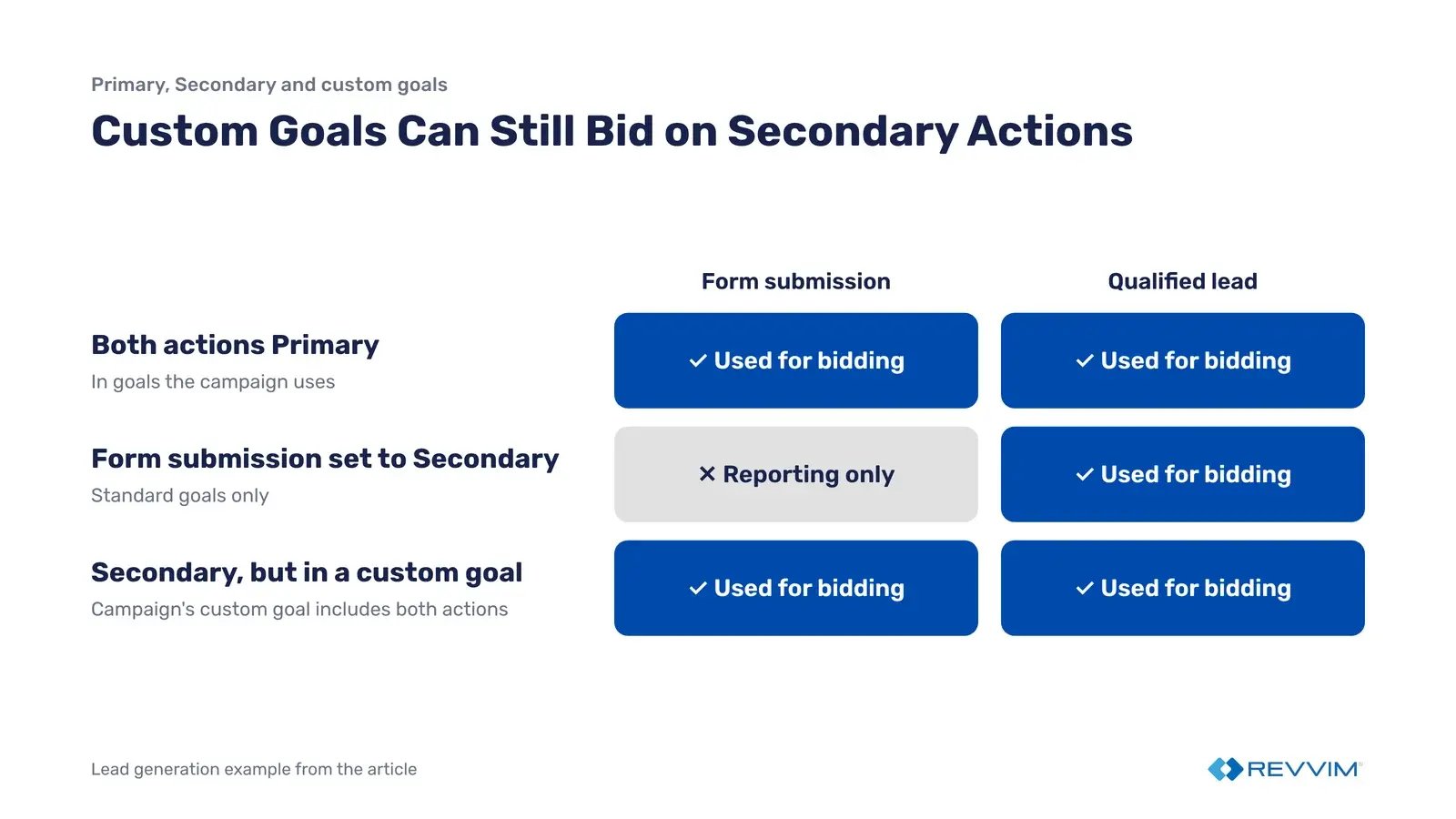
How Conversion Settings Affect Bidding and Reporting
|
Conversion Setting |
Used for Bidding? |
Conversions Column? |
All Conv. Column? |
|---|---|---|---|
|
Primary action in a selected standard goal |
Yes |
Yes |
Yes |
|
Primary action in an unselected standard goal |
No, not directly |
No |
Yes |
|
Secondary action in a standard goal |
No |
No |
Yes |
|
Primary or Secondary action in a selected custom goal |
Yes |
Yes |
Yes |
The distinction between account-default, campaign-specific, and custom goals matters just as much.
Account-default goals apply to campaigns using the account's default conversion settings. Google generally recommends them because campaigns can share learning across common objectives. Keep only one stage of the same funnel as an account-default goal. If Submit lead form and Qualified lead are both account-default, every campaign on default settings bids toward both.
Campaign-specific goals override those defaults when a campaign needs a different outcome. For example, a brand campaign focused on purchases may need to optimize only for completed transactions rather than the broader set of lead and engagement actions used elsewhere in the account. But separating brand goals simply for reporting purposes can introduce unnecessary differences in optimization.
Custom goals let advertisers combine actions from different standard goals, including Secondary actions. They're useful for specialized objectives, but they require careful review because the Primary or Secondary label alone no longer tells the full story. Google describes custom goals as an advanced option it doesn't recommend in most cases, and a campaign can bid toward only one custom goal, so it has to contain every action you want that campaign to bid on.
Two Settings Worth Checking Before Changing Bidding
Before you change bidding, confirm that the new conversion action is actually Primary in Google Ads and that any scripts or integrations read primary_for_goal. Either setting can make Google bid toward something other than what you intended.
First, Google Analytics 4 (GA4) conversions created through the Analytics interface are Secondary by default in Google Ads. A qualified lead event can be recording correctly in GA4 and appearing in Google Ads under All conv. without serving as the campaign's bidding objective. Check Goals → Conversions → Summary, open the action, and review its Action optimization setting. Also verify that the campaign actually uses the corresponding goal.
Second, accounts relying on scripts or application programming interface (API) integrations need to check their conversion-goal logic. Google deprecated include_in_conversions_metric in favor of primary_for_goal in 2022, when the field became read-only. Scripts that still depend on the old field may misrepresent which actions are intended for bidding, particularly when campaign-specific or custom goals are involved. Google's Google Ads API conversion goals guide documents the current behavior.
For growth leaders, these settings determine what Google is being rewarded for producing. If Smart Bidding is optimizing toward form fills while the business evaluates success based on qualified opportunities or revenue, the campaign can appear efficient in Google Ads while delivering weaker business results. Before changing targets or blaming the algorithm, confirm that the conversion actions driving bids match the outcomes the business actually values.
How Long Does Smart Bidding Take to Settle After a Change?
Google Ads may display a Learning status for up to seven days after a major structural change, but Smart Bidding typically takes one to two conversion cycles to adjust to a new goal. The actual timeline depends on conversion volume, how long customers take to convert, and how restrictive the campaign settings are.
The Learning label disappearing doesn't mean performance has stabilized. Google continues adjusting bids using new and historical conversion data, whether the campaign displays Learning status or not.
According to Google's Smart Bidding learning documentation, three types of changes can trigger the visible status:
- New strategy: Creating or reactivating a bid strategy.
- Composition change: Adding or removing campaigns, ad groups, or keywords within a bid strategy.
- Goal change: Significantly changing the conversion goals or actions used for optimization.
Changes to budgets, CPA or ROAS targets, creatives, and targeting do not trigger the Learning status, although they can still affect bidding performance.
Your Conversion Cycle Determines the Timeline
The longer your customers take to convert, the longer Smart Bidding needs after a goal change. Plan for one to two conversion cycles, measured from your own Days to conversion data rather than a fixed number of days.
A conversion cycle is the typical time between an ad click and a recorded conversion, including relevant reporting delays. A purchase might happen the same day, while a qualified lead may take weeks to move through a customer relationship management (CRM) system and reach Google Ads.
That difference changes how long advertisers should allow before evaluating a new goal.
|
Typical Conversion Cycle |
Approximate Adjustment Window |
What to Watch |
|---|---|---|
|
3 days |
3–6 days |
Conversion volume, CPA, early fluctuations |
|
7 days |
7–14 days |
Conversion trends, CPA or ROAS, spend |
|
14 days |
14–28 days |
Delayed conversions, lead quality, target attainment |
|
30 days |
30–60 days |
CRM import delays, qualified leads, revenue reporting |
To find your conversion delay, open Campaigns → Segment → Conversions → Days to conversion in Google Ads. Set the date range to end at least 30 days ago, or longer if your conversion window is longer, so the report has complete conversion data. The bid strategy report also shows conversion delay information and estimates of conversions that may not have been reported yet.
Three factors can extend the adjustment period: limited conversion volume, longer conversion cycles, and restrictive campaign settings. Tight CPA or ROAS targets, low daily budgets, and narrow targeting can limit the data and opportunities available to the bidder. Google also warns that Performance Max may take longer to reach performance goals when most traffic comes from outside Search or Shopping.
The trap is evaluating performance before conversions have arrived. Suppose a team switches from form submissions to qualified leads that typically take 14 days to report. After one week, Google Ads may show fewer conversions and a higher CPA. Some of those leads simply haven't been qualified or imported yet.
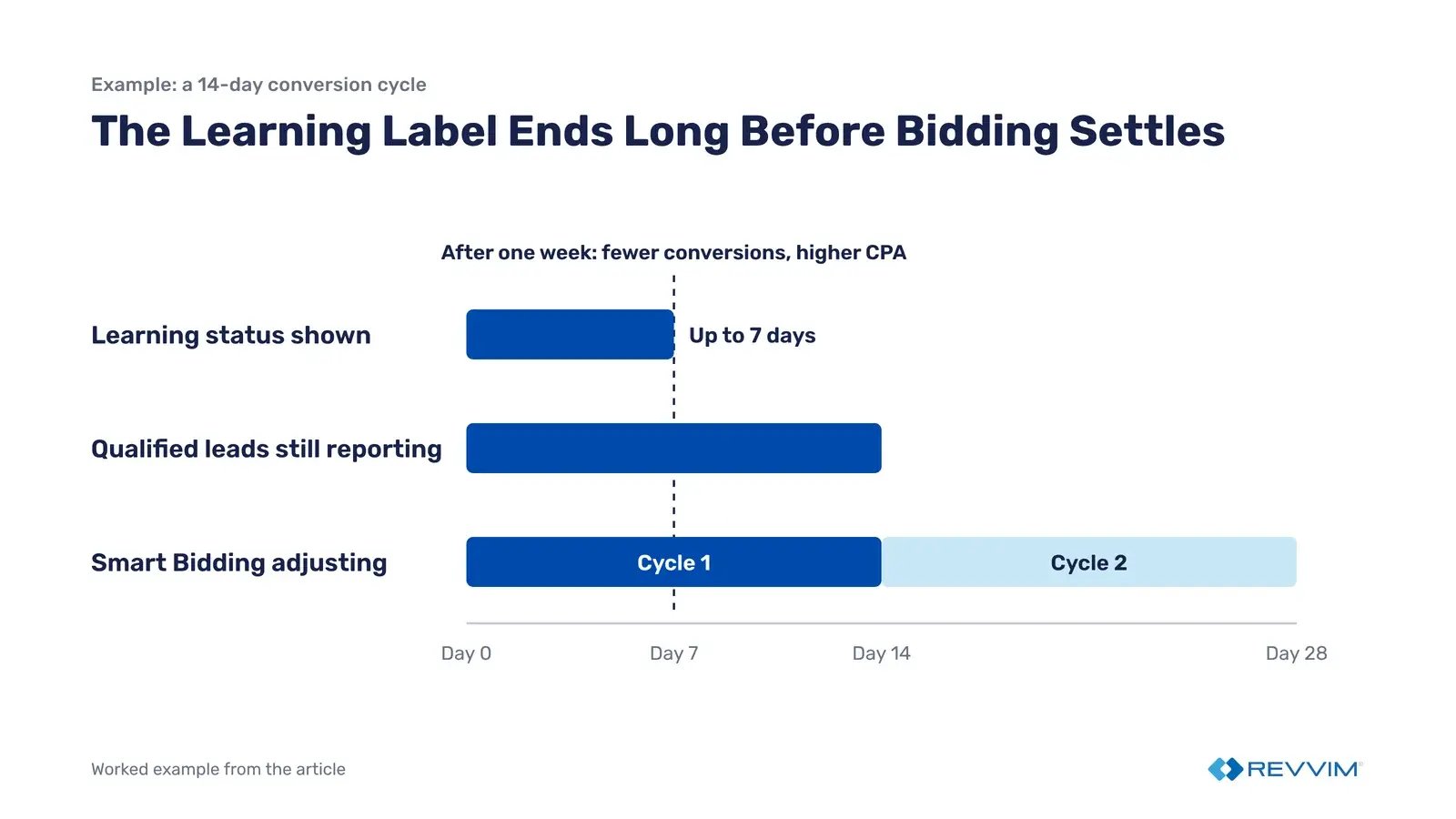
Rolling back the change at that point could abandon a more valuable bidding signal based on incomplete results.
I saw this with a direct-to-consumer subscription brand moving from Target CPA ($32 per order) to a 320% Target ROAS so bidding would favor multi-month bundles over starter kits. Even after four weeks of feeding order values, the first week on Target ROAS showed about 20% fewer orders and a $44 CPA, and the growth team questioned whether the strategy was stalling. Two full purchase cycles later, order count was slightly lower, but average order value had risen enough to beat the 320% target and lift contribution margin.
How Do You Switch Conversion Actions Without a Performance Cliff?
The safest way to change conversion actions in Google Ads is to validate the new conversion data before making it a bidding objective, then give Smart Bidding time to adjust. Google's recommended transition depends on whether you're keeping the same bid strategy, switching to value-based bidding, or moving from upper-funnel to lower-funnel conversions.
Changing conversion actions without preparing the new signals can create problems that look like poor bidding performance. A qualified lead action might be importing only half the expected records, or purchase values might be reported in the wrong currency. Smart Bidding cannot compensate for unreliable conversion data.
Before making the switch, confirm that budgets reflect what you actually intend to spend. In Goals → Conversions → Summary, check that the new action is recording correctly, reporting the expected values, and receiving conversions consistently. For offline conversions, verify import frequency, rejected records, and reporting delays.
From there, Google's guidance separates into three scenarios.
|
Scenario |
Google's Recommended Steps |
Adjustment Period |
|---|---|---|
|
1. Change conversion goals, keep the same bid strategy |
Create and verify the new action without making it Primary or account default. Switch the selected goal or update its Primary actions. Keep the existing bid strategy and adjust targets as needed. |
Typically 1–2 conversion cycles after the switch |
|
2. Change goals and move from Target CPA to Target ROAS |
Validate the new goal and conversion values, then switch goals while staying on Target CPA. Allow value data to accumulate before moving to Target ROAS, using historical performance to set the initial target. |
Approximately 1–2 cycles on Target CPA, followed by another 1–2 cycles of adjustment after switching to Target ROAS |
|
3. Move from upper-funnel to lower-funnel conversions while staying on Target CPA |
Configure the lower-funnel action as Primary without selecting it for bidding. Collect conversion data before switching goals, then adjust the CPA target to reflect the lower-funnel outcome. |
At least 2–3 conversion cycles of data collection before the goal switch |
The third scenario is particularly important for lead generation accounts. Suppose a campaign currently optimizes for submitted forms, but the sales team wants it to optimize for qualified leads.
Google recommends assigning the new action to the Qualified lead or Converted lead category, marking it Primary, and keeping it out of bid optimization at both the campaign and account level initially. Track those conversions for at least two to three conversion cycles so Smart Bidding can learn from the data in the background. If those leads come from offline imports, upload them consistently, ideally daily, and expect a longer ramp-up when conversion delays are long.
Once the data is established, switch the bidding goal from form submissions to qualified leads. Google recommends raising the Target CPA to the historically achieved CPA for those lower-funnel conversions, rather than carrying over the cheaper form submission target.
Choose a Bid Strategy That Fits the Transition
Use Maximize Conversions or Maximize Conversion Value when budgets will stay stable and the bidder can have more control. Use Target CPA or Target ROAS when you need specific efficiency targets or expect large budget changes.
Google's conversion goal transition guidance also distinguishes between strategies that maximize results within a budget and those that give advertisers explicit efficiency targets.
Maximize Conversions or Maximize Conversion Value may be appropriate when budgets are expected to remain relatively stable for the next four to six weeks and the business can give the bidder more flexibility.
Target CPA or Target ROAS may be more appropriate when large budget changes are planned, specific efficiency targets must be maintained, or the team needs to adjust those targets closely during the transition.
For a move from Target CPA to Target ROAS, Google recommends remaining on Target CPA for approximately one to two conversion cycles after changing the goal. When the value data is ready, set the initial Target ROAS using the previous four weeks of historical ROAS, excluding incomplete data affected by conversion delay. Google's value-based bidding guidance adds two minimums. Upload values for at least three weeks or one to two conversion cycles, whichever is longer, before switching, and aim for at least 15 conversions in the last 30 days before using Target ROAS. Google also requires at least two different conversion values.
The operational risk is changing too many things before the new data has a chance to mature. If the team changes conversion goals, bid strategies, CPA targets, and budgets together, it becomes difficult to determine whether subsequent performance changes reflect bidding adaptation, incomplete reporting, or the new conversion objective.
Paid Search should own the bidding transition, while Analytics or Revenue Operations validates the conversion data. Finance and Growth leadership should agree on what the new outcome is worth before targets are reset.
A staged transition cannot guarantee that performance will remain flat. It gives the business a better chance of preserving valuable conversion data, identifying genuine performance problems, and avoiding a rollback based on incomplete results.
If results look wrong after a switch, these checks usually explain it:
|
Symptom |
Likely cause |
What to check |
|---|---|---|
|
Fewer conversions and a higher CPA right after moving to qualified leads |
The lower-funnel action converts less often and reports later |
Days to conversion segment; wait one to two conversion cycles before judging |
|
A new GA4 qualified-lead action appears in All conv. but not Conversions |
GA4-created conversions are Secondary by default in Google Ads |
Set it to Primary in Google Ads and confirm the campaign uses its goal |
|
The campaign still bids toward form fills after they were set to Secondary |
The action sits in a custom goal the campaign uses |
The campaign's custom goal |
|
Conversion volume jumps with no change in demand |
Counting changed from One to Every |
The action's Count setting and repeat rate |
Which Targets Should You Change First, and When?
When changing conversion goals, adjust your CPA or ROAS targets to reflect the new outcome. Google recommends using the historically achieved CPA when moving to lower-funnel conversions, or the previous four weeks of ROAS when switching to value-based bidding. Allow one to two conversion cycles before judging whether the new targets are working.
One of the easiest mistakes during a conversion goal transition is keeping a target that was built around the old conversion action.
Consider an ecommerce retailer switching from optimizing for purchases to optimizing for purchase value. Under Target CPA, a $50 order and a $500 order may count equally as conversions. Moving to Target ROAS changes the objective: Google now considers the revenue generated, not just the number of orders.
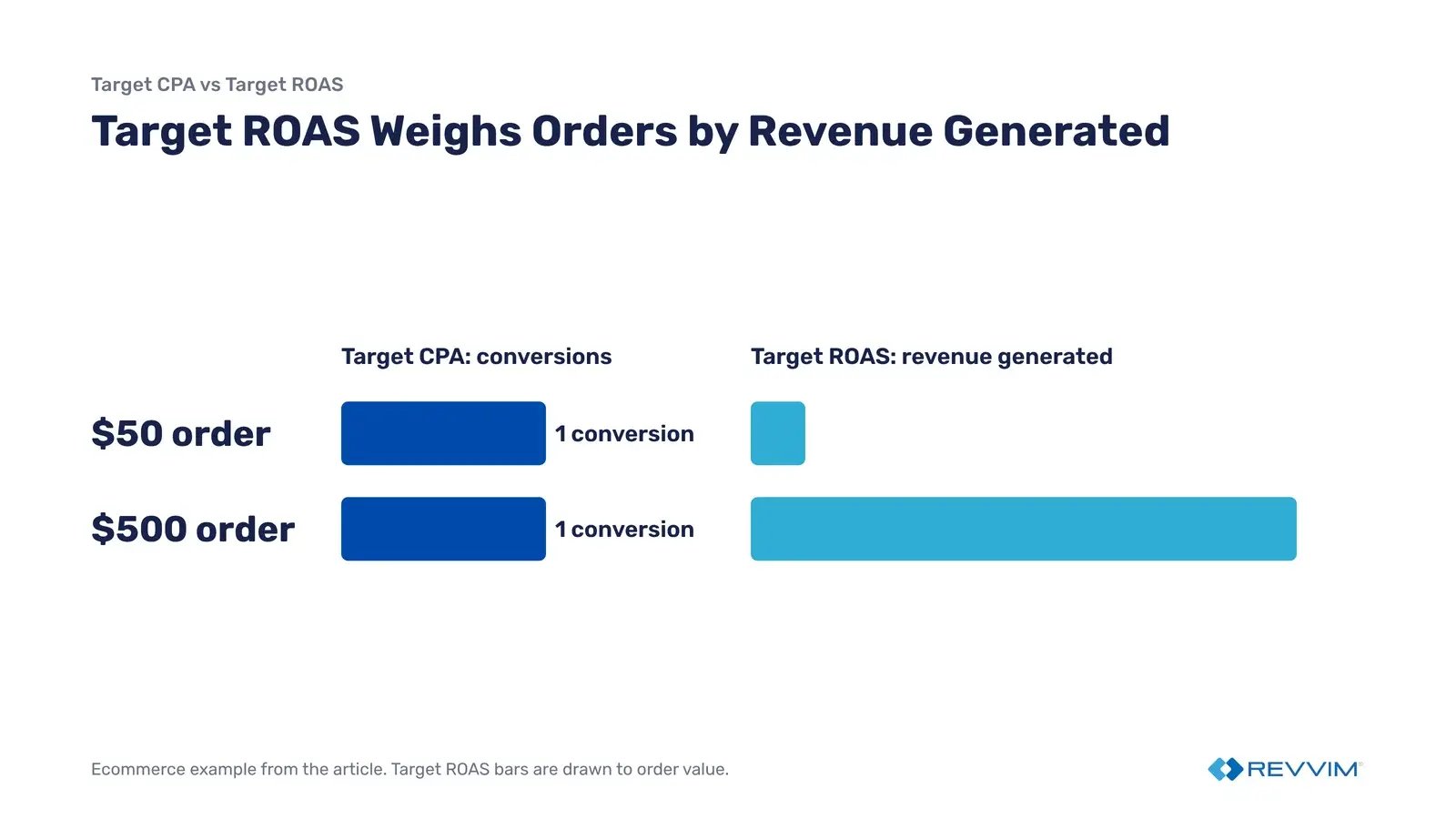
Carrying over performance expectations from the old strategy without recalibrating the ROAS target can restrict bidding and limit sales opportunities while Smart Bidding adjusts to the new objective.
Google's recommended starting targets depend on the type of transition.
Google's Target Adjustment Rules
|
Scenario |
Google's Recommended Target |
|---|---|
|
Moving from upper-funnel to lower-funnel conversions on Target CPA |
Raise the CPA target to the historically achieved CPA for the lower-funnel conversion action. Monitor spend and adjust as needed. |
|
Changing goals and moving from Target CPA to Target ROAS |
Remain on Target CPA for approximately 1–2 conversion cycles after the goal change. Then set Target ROAS using the previous four weeks of historical ROAS, excluding conversion delay. |
|
Adjusting an existing CPA or ROAS target |
Make changes as business needs require, but avoid repeated adjustments within a single conversion cycle unless necessary. |
Target changes take effect quickly, but reported performance takes longer to catch up. Google's Search Smart Bidding guidance recommends evaluating results over at least one to two conversion cycles in the bid strategy report.
This is also where conversion counting settings can distort the comparison.
If an advertiser changes a conversion action from One to Every, Google Ads may begin counting multiple conversions from the same ad interaction instead of just one. That changes reported conversion volume and potentially the CPA or ROAS associated with the action, even if customer behavior hasn't changed.
Google confirms that counting changes only apply to future conversion reporting. Historical results are not recalculated. Before switching, check the action's repeat rate in the Conversion actions table. Google calculates it as the conversions you'd record with Every divided by those you'd record with One, so a repeat rate of 1.5 means roughly 50% more reported conversions after the change. Comparing the new CPA against the old target without accounting for that measurement change can lead to the wrong bidding decision.
Avoid making repeated target adjustments in response to incomplete data. Smart Bidding responds to target changes immediately, but performance typically takes one to two conversion cycles to converge. Changing targets several times before conversions have been reported makes it harder to evaluate the impact of each adjustment.
Changing conversion actions is ultimately a decision about what the business wants Google Ads to optimize for. The transition may produce fewer reported conversions, a higher CPA, or temporary performance fluctuations, but those numbers need to be evaluated against the value of the customers and revenue generated.
Marketing, Analytics, and Finance should agree on what success looks like before making the switch, then give Smart Bidding enough time and reliable data to adjust.
Frequently Asked Questions
How Long Does Learning Take After Conversion Changes?
Google Ads may display a Learning status for up to seven days after significant conversion goal changes. However, Smart Bidding typically needs one to two conversion cycles to adjust its performance. The Learning label can disappear before bidding stabilizes, particularly when conversions take weeks to occur or reach Google Ads.
How Do I Transition Without a Performance Cliff?
Set budgets to their intended levels, create the new conversion action, and verify that it records accurate conversion data before using it for bidding. Then switch the selected conversion goal and adjust targets to reflect the new outcome. Allow one to two conversion cycles for adaptation. A staged transition reduces unnecessary disruption but cannot guarantee stable performance.
What Targets Should I Change First?
When moving from upper-funnel to lower-funnel conversions on Target CPA, Google recommends using the historically achieved CPA for the lower-funnel action. When switching to Target ROAS, use the previous four weeks of historical ROAS, excluding conversion delay. Avoid repeated target adjustments before enough conversion data has accumulated to evaluate performance.
Ready to see if you’re overpaying for branded search?
Request a demo to start the risk-free, 30-day AdAi trial to quantify your trapped capital and reclaim budget to fund your growth campaigns.